

The universal connector for your information system
Nodalio moves your data between Sage X3 and the applications around it. Every flow is scheduled, traced and checked, without multiplying interfaces.
Every new application means new interfaces
An ERP never lives alone. Around it you find a logistics provider, a legacy system, other ERPs of the group, partners sending files, an online shop. Connecting these applications two by two quickly creates a web of interfaces built over time, each with its own formats, schedules and errors. With eight applications you can reach 28 interfaces: the slightest change means reworking several of them.
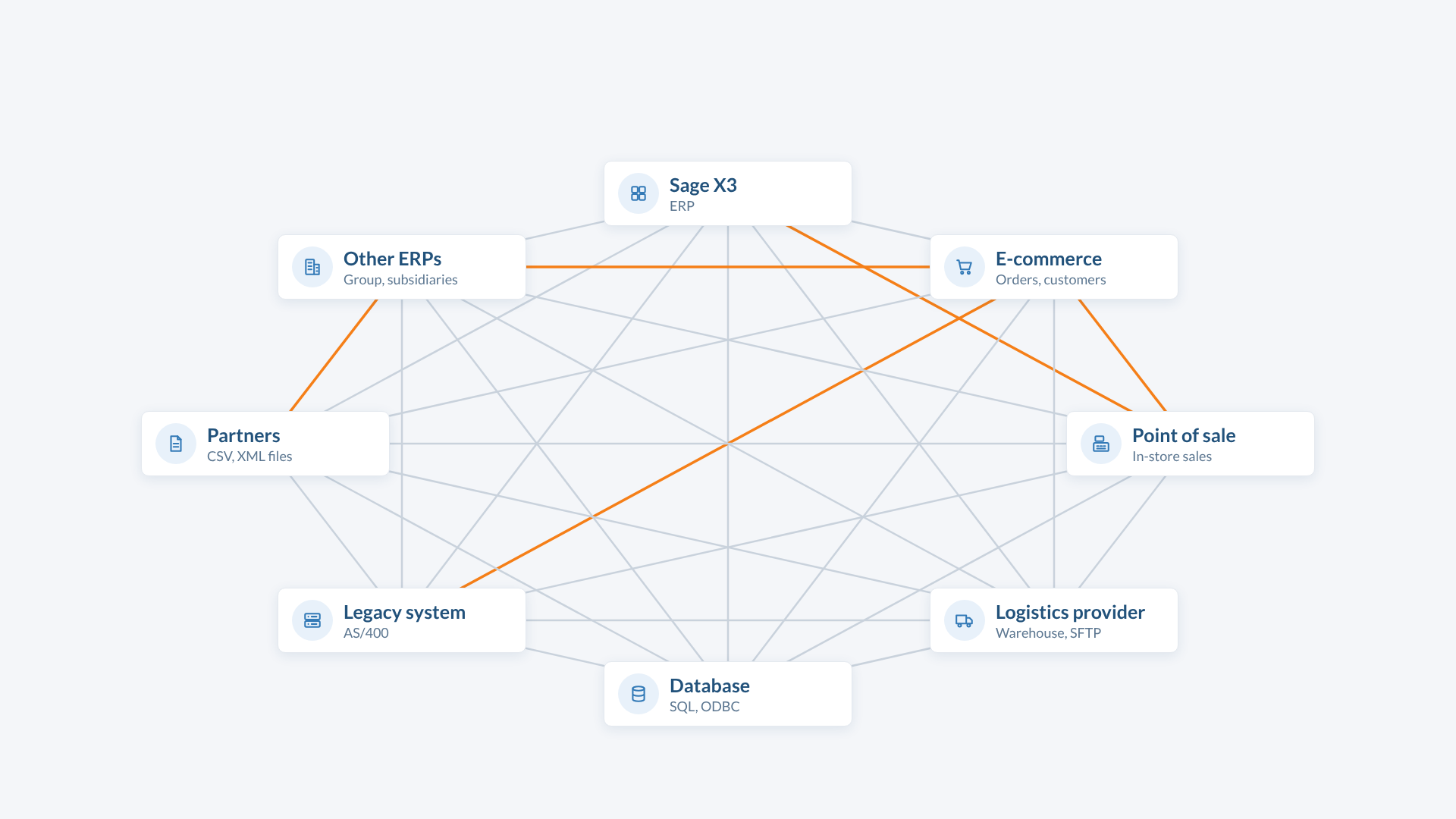
A star architecture, with Nodalio at the centre
With Nodalio, each application is connected only once: to Nodalio. It collects the data, converts it to the expected format, checks it and delivers it to the right recipient at the right time. Adding an application means adding one connection, not a series of interfaces.
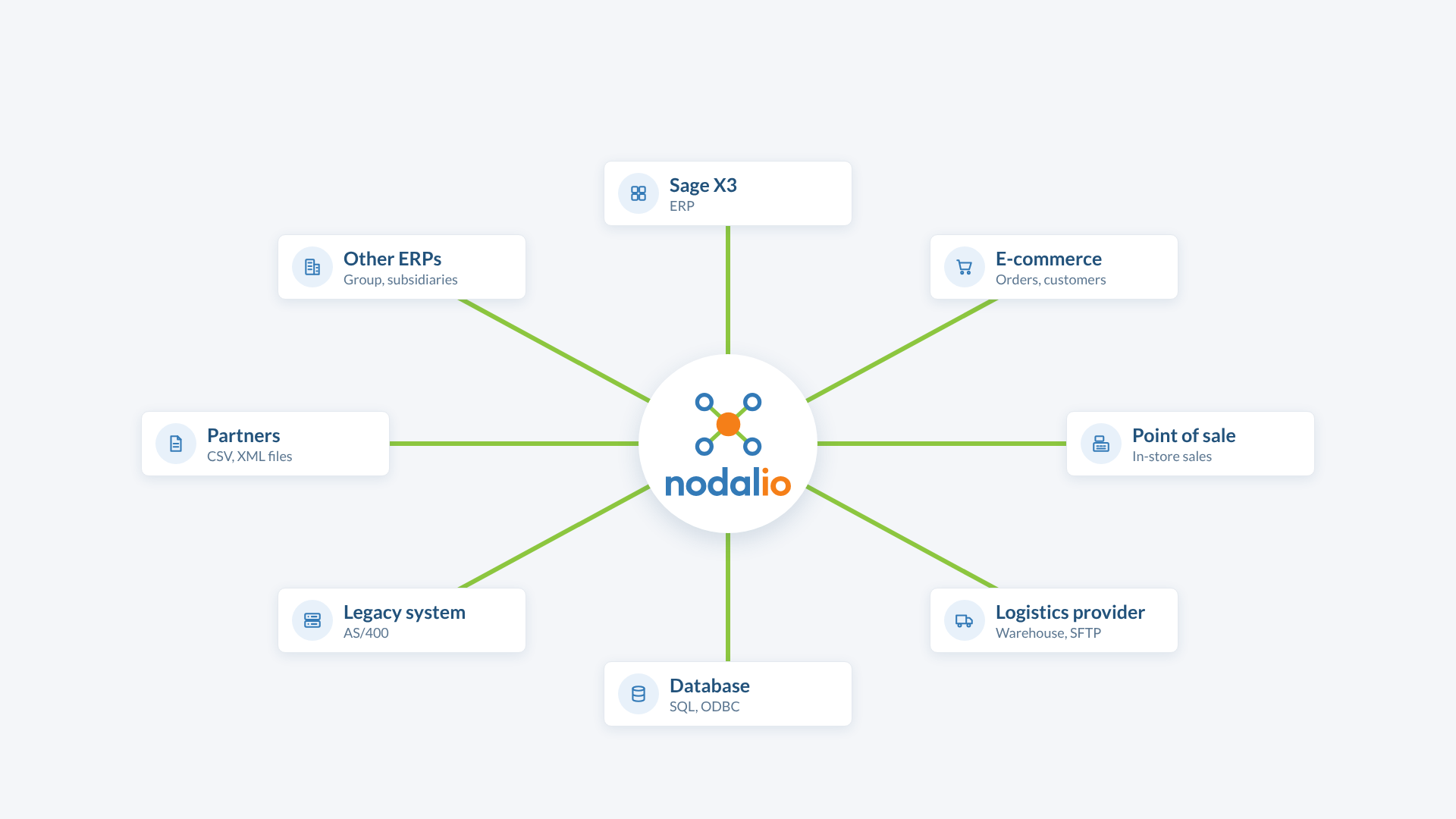
What Nodalio does
Collects your data where it is
SFTP servers, CSV and XML files, databases (including AS/400), exports from other ERPs.
Converts it to the right format
Code mappings, transcription rules and models described in configuration files, editable without new development.
Imports it into Sage X3
Through the standard import templates or the Sage X3 web services, which return the detail of each error.
Sends it to your partners
Files generated in the required format and dropped on their SFTP, never overwriting a previous drop.
Sends only what changed
Exports are incremental: only created or modified data leaves.
Schedules every flow
Each flow runs at the times you set, to the minute.
Keeps track of everything
Every run is logged: what was read, converted, imported or rejected.
Warns you when something goes wrong
Rejected records are isolated and reported by e-mail, to be fixed and re-imported.
How it works
Collect
Nodalio fetches the data at the source, at the scheduled time: a file on an SFTP, a database table, an export from another system.
Convert and check
It applies the mappings and rules of your configuration, then checks each record before sending it.
Deliver and trace
It imports the data into Sage X3 or drops it at the recipient, logs the result and reports rejections.
Flow examples
Invoices from a legacy system into Sage X3
Nodalio reads invoices and customers in the AS/400 database, transcribes them and imports them into Sage X3 through web services. Each rejected invoice is reported with the reason.
Items from a group ERP into Sage X3
Item files dropped by the group on an SFTP are collected, deduplicated, transcribed and imported into Sage X3. Processed files are archived.
Sage X3 items to a logistics provider
Nodalio reads items in Sage X3, keeps only those that changed, generates the file in the provider’s format and drops it on its SFTP.
Coming soon : connectors for online shops and point-of-sale software.
Security and operations
Installed on your premises
Nodalio runs on your Windows servers. Your data never goes through an external service.
Read-only access
Reading in Sage X3 uses a dedicated SQL account limited to queries.
Passwords outside the program
Credentials are stored in a protected configuration file, never in the code.
Part of your operations
Flows start from the Windows task scheduler or as a service, and leave logs your teams can use.
The Sage X3 pack
To get started faster, Nodalio can come with a pack of ready-to-use Sage X3 templates: items, orders, deliveries, production declarations. They are adapted to your folder during configuration. See licences and services.
Designed by Sage X3 specialists
Nodalio is developed by SI Solutions, a consulting and integration firm specialised in Sage X3. We know its import templates, its web services and its database: we know what a flow must check before it reaches your ERP. We configure Nodalio with you, flow by flow, and stay by your side as it evolves.
Frequently asked questions
Does Nodalio only work with Sage X3?
Nodalio was born around Sage X3, which remains its strong point. Its architecture can connect other systems together: ERPs, databases, files, partners.
Does Sage X3 need to be modified?
No. Nodalio uses the standard Sage X3 means: import templates and web services. Reading uses a read-only account.
What happens when a record is rejected?
It is isolated, the reason is logged and an e-mail alert is sent. The rest of the flow keeps being processed.
Can a flow be added later?
Yes. Each flow is described in the configuration: adding one does not affect the others.
Where is Nodalio installed?
On your servers, under Windows Server. No data goes through an external service.

Your flows deserve better than a pile of interfaces
Let’s talk about your data exchanges: we will show you Nodalio on a case close to yours.
Request a demoSage and Sage X3 are trademarks of The Sage Group plc or its subsidiaries. Other product names belong to their respective owners.